Sort “Mobile import” groups chronologically by using ISO dates in group names
Problem:
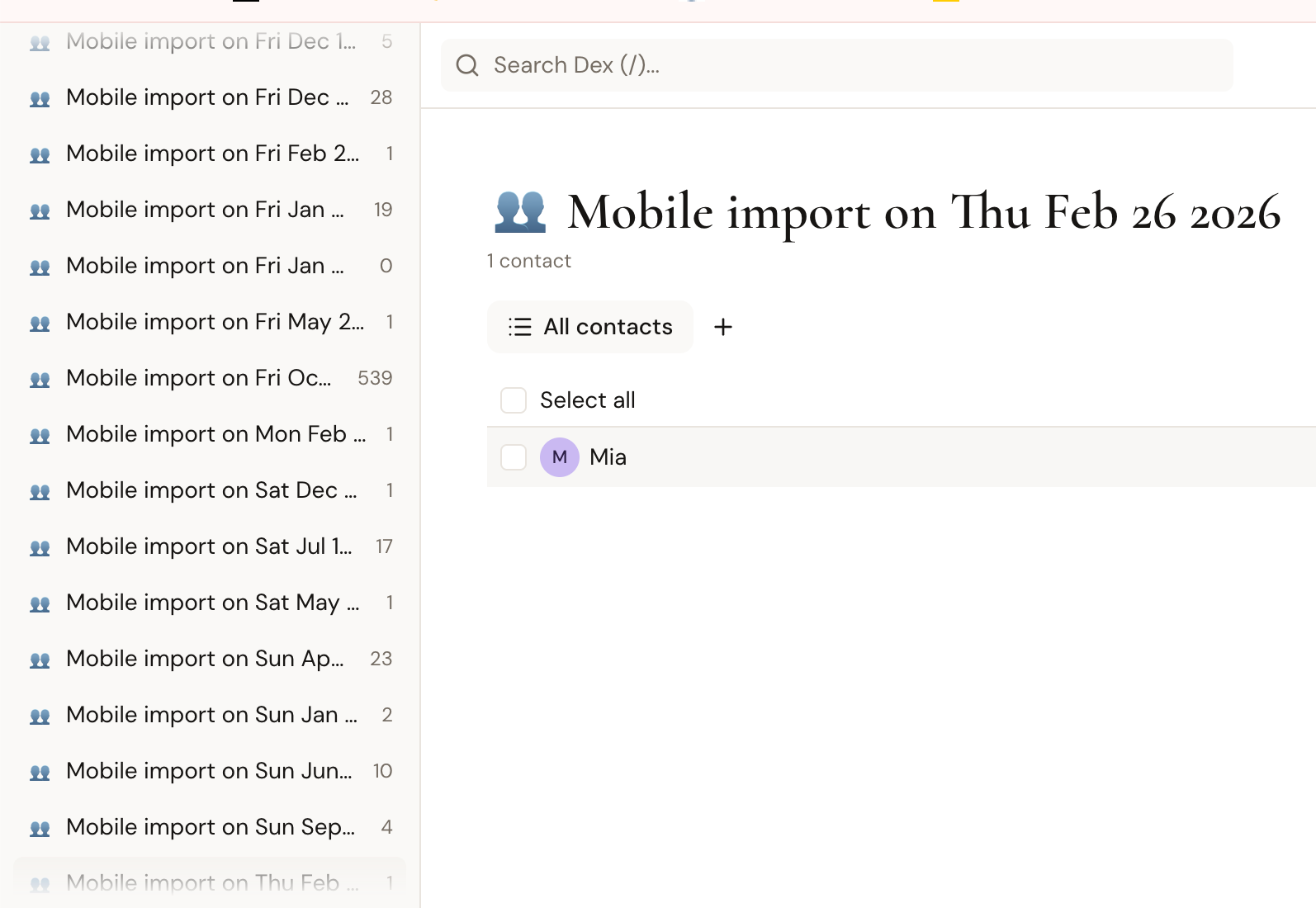
My list of groups is spammed with “Mobile import on…”, and they, for whatever reason, are sorted alphabetically by weekday.
Solution:
Instead of “Thu Feb 26 2026”
Create name “Mobile import on 2026-02-26”
so that they are sorted by year and month
Easy one-line fix:
replace "Mobile import on Mon Jan 02 2006" or "Mobile import on %a %b %d %Y"
to time.Parse("Mobile import on 2006-01-02 Mon" or "%Y-%m-%d %a" or "yyyy-MM-dd EEE"
Hard fix:
Migrate existing group names to the new format. But this is optional.
Impact:
When I am searching, I remember I was in Vienna at the end of November before Christmas. So I am looking between 2026-11 and 2026-12.
Currently, I need to go through 7 days of the week to find the month, and the letters “N” and “D” are away.
Workaround:
Requires paying for a separate DAVx⁵ – CalDAV CardDAV WebDAV application.
https://play.google.com/store/apps/details?id=at.bitfire.davdroid&hl=en
Dex customers pay $240/y, so they can afford it.
Another workaround:
When exchanging contact info, write the phone number directly to Dex. But how will their name appear on the screen when the person is calling or messaging me? I saw something like a one-way sync from Dex (as the source of truth) to Android, but I have not checked it.
Ultimate Outcome:
Automatic, reliable sync of mobile contacts both ways. Between Dex and the default phone app on Android.
User story:
You see, I imported 5 hundred contacts when I first downloaded Dex.
I travel around the world and meet new people all the time.
When I spend a week in a new country or after networking events, I import a dozen mobile contacts.
Sometimes I want to write notes about what happened and set reminders on the day I met that person. So I click import from phone, even if it is for 1 contact.
When we connect with a new person on LinkedIn or DM on Instagram, it does not create a new group, but silently adds to the existing one. That’s good.
If adding a creation date is useful to differentiate which “John Smith” this contact is, Dex could add it as a note in the timeline.
OS: Android 17
Model: Google Pixel.
I want Dex to be the source of truth.
I read before submitting post:
https://getdex.com/docs/integrationsandfeatures/syncfeatures/sync-google
https://getdex.com/docs/integrationsandfeatures/syncfeatures/two-way-sync
https://feedback.getdex.com/en/p/reinstate-direct-google-contacts-one-way-sync
https://feedback.getdex.com/en/p/two-way-contact-sync-google-contacts
Log in to comment and vote
Comments1
Dex Operations
Sep 21
This has been added - new import groups are named "Mobile import on YYYY-MM-DD", so they sort chronologically.
New imports only. Existing groups keep their old names and need renaming by hand.